

This article was prepared with AI assistance.
A landing-page hero has a limited amount of space to establish what a business offers and help visitors decide where to go next. An illustration can support that introduction, but turning it into a video changes more than its appearance. Movement affects how the heading reads, where attention settles, and whether someone can comfortably remain on the page.
For a WordPress site built with Divi, start by treating the hero as a complete composition: heading, explanation, action, and visual. Choose the visual workflow after those elements make sense together. Three useful candidates are a static illustration, an authored animation built on a timeline, and a clearly identified generative motion study. They serve different purposes and require different approval decisions.
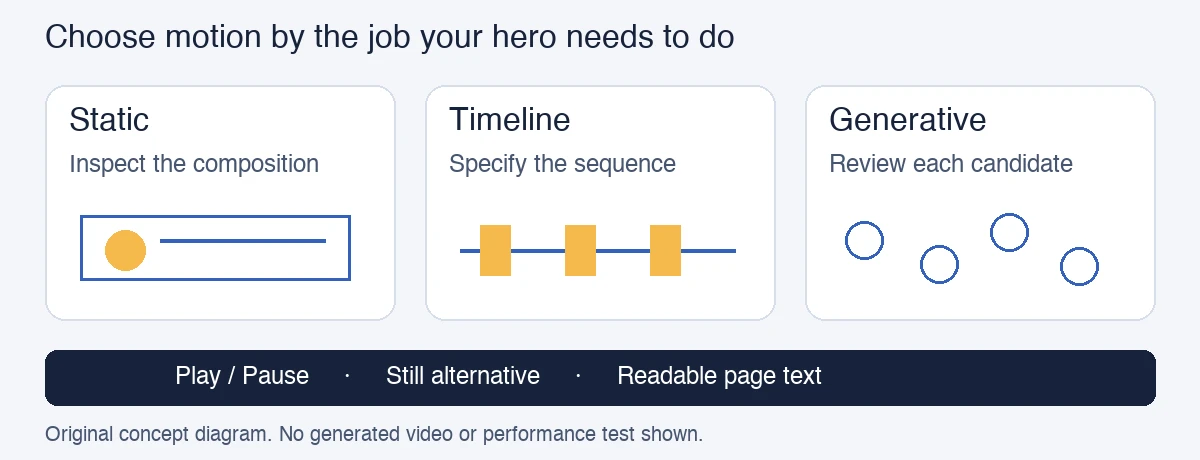
Original concept diagram. No generated video or performance test is shown.
Write the visual brief before choosing the workflow
Describe what the illustration should communicate in one sentence. A fictional workspace scene might suggest an organized service, while a diagram might explain how an enquiry becomes a completed project. Keep this brief separate from the sales copy. An attractive visual should not introduce promises that the business cannot support.
Use artwork you own or have permission to adapt. For the initial layout, leave logos, interface screenshots, and essential wording outside the illustration. Keeping headings and buttons as page content makes them easier to revise and avoids relying on tiny text inside a media file.
Decide what would make a candidate unsuitable before producing it. Examples include movement behind the main heading, changes to important diagram relationships, or a crop that hides the subject on mobile. This creates an approval framework without pretending that any particular workflow will improve conversions.
Candidate one: a static illustration
A static version gives the visitor time to inspect the artwork. It can be particularly useful when the image contains a process, several connected objects, or details that should remain consistent. It also provides a reference against which moving versions can be judged.
Place the original illustration in the proposed hero and review the composition. Does it support the heading? Is the primary action obvious? Does the page remain understandable when the visual is absent? Those questions are useful even if the final choice is a video.
A still image will not create continuous movement, but that is not a defect when movement has no explanatory role. Keep this candidate available throughout the project. It can become the published choice, a preview image, or the alternative shown when motion is turned off.
Candidate two: an authored timeline preview
A timeline workflow is appropriate when the movement needs to follow a deliberate sequence. The designer sets changes over time, such as an object entering the frame or the view moving between two positions. Separate artwork layers make independent movement easier to plan; a flattened illustration may require additional preparation.
Build a preview around one defined action. For a fictional workspace, that might mean a paper shape moving into a tray while the rest of the composition stays still. The purpose is to evaluate the relationship between the motion and the page, not to demonstrate every animation technique.
The advantage is control over the intended sequence. The tradeoff is the work required to prepare assets, adjust timing, and review the export. If the movement must preserve an exact diagram or reveal content at a specified moment, that effort may be easier to justify than a less predictable approach.
Candidate three: a labeled generative motion study
Generative image-to-video can help explore a scene when the creator allows variation in its movement. For example, Magic Hour image-to-video accepts an uploaded illustration, offers an optional motion description, and lets the creator generate, preview, and download an MP4. Available capabilities depend on the selected model. For a broader comparison of prompt-led and image-led concepts, Magic Hour’s AI video generator offers another starting point for a motion study that should undergo the same review.
Use this as a candidate-making workflow rather than an automatic publishing step. Inspect the complete clip for changed shapes, unexpected objects, and details that no longer match the brief. Keep essential lettering outside the source illustration because generated frames can alter fine details.
Label a generative concept clearly when its origin matters to understanding the page. It should not imply that a fictional workspace, product behavior, or customer activity is documentary footage. If the result suggests an unsupported claim, revise the visual or return to the static candidate.
Plan playback and alternatives as part of the design
A hero video should have a clear way to start and stop movement. Avoid assuming that a background-video setting provides the same usable controls as a visible player. Check the actual Divi configuration and rendered page before choosing a playback approach.
WordPress’s standard Video block documents controls, a poster image, and caption-track options. These are useful reference points when deciding what the visitor needs, but they do not establish how a particular Divi module behaves. Verify the controls in the implementation you actually use.
Provide a still alternative and keep essential information in readable page text. If speech contributes meaning, include accurate captions. If meaningful visual information is not explained by the page, add an appropriate description. Decorative movement should not carry instructions that visitors must watch to understand. For an explainer featuring a fictional or expressly authorised presenter, lip sync AI can align mouth movements with a supplied narration track; clearly label the result as a synthetic presentation and never imply that the presenter actually spoke the supplied words.
Finally, review the hero on desktop and a narrow screen, with playback paused and with the still alternative selected. Check the heading, crop, action, and loading behavior together. Publish the candidate that supports the page’s purpose, and retain the source artwork so future changes do not require rebuilding the whole idea.